What an EOB Actually Is
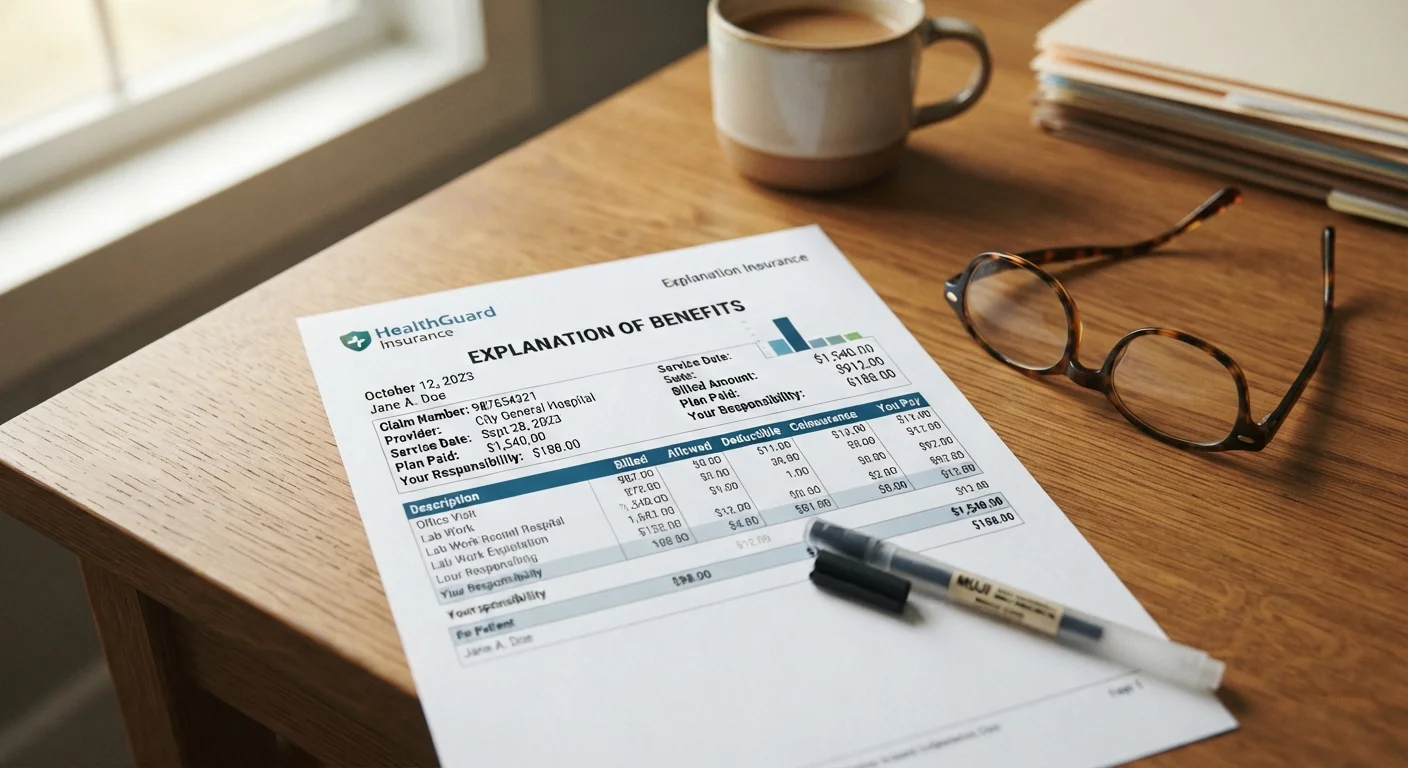
An Explanation of Benefits (EOB) is a document your health insurer sends you every time it processes a claim on your behalf. It is a summary - not an invoice. Its job is to show you what your provider billed, what your insurer agreed to pay, and what portion (if any) remains your responsibility under your plan's cost-sharing structure.
EOBs apply to most health insurance claims: doctor visits, specialist appointments, lab work, hospital stays, and prescriptions depending on your plan type. Understanding your plan's structure - whether it's an HMO, PPO, or HDHP - affects how your EOB is calculated. See our overview of health insurance plan types for context on how different plans handle cost-sharing.
An EOB Is Not a Bill
Receiving an EOB does not mean you owe money right now. Wait for the actual bill from your provider before making any payment. Paying a bill before your insurer has fully processed the claim can result in overpaying. Always match the provider bill to the corresponding EOB first.
Familiarity with your plan's cost-sharing basics is the foundation for reading an EOB accurately. Our primer on deductibles, premiums, and copays explains the terms you'll encounter on every statement.
What You'll Need Before You Start
Before working through your EOB, gather a few items to make the review efficient and accurate.
What you will need
EOB Statement
The document your insurer sends after processing a claim - the primary item you will review.
Provider Bill (Itemized)
The bill from your doctor or facility used to cross-check the charges listed on your EOB.
Insurer Member Portal
Online access to your EOB history, claim status, and deductible tracker.
Summary of Benefits and Coverage (SBC)
Your plan's standardized cost-sharing document, useful for verifying what your plan covers.
Having your plan's Summary of Benefits and Coverage nearby is especially useful if you're questioning whether a service should have been covered at all. If a claim denial stems from a service your plan excludes outright, understanding how policy exclusions work can clarify whether an appeal makes sense or not.
How to Read Your EOB Step by Step
Errors on EOBs Are More Common Than You Think
Billing codes are entered manually and mistakes happen. If a service looks unfamiliar, a charge seems duplicated, or the math doesn't add up, contact your insurer and your provider before paying anything. Disputing an error is your right, and catching one early is far easier than recovering a payment after the fact.
Locate and Identify Your EOB
Your insurer mails an EOB after every claim is processed, or posts it to your online member portal within a few days of processing. Look for a header that reads Explanation of Benefits or EOB. Confirm it matches the date of service and the provider you visited. If you have multiple claims, each may generate a separate EOB.
Review the Patient and Service Information
Check that the patient name, member ID, date of service, and provider name are all correct. A wrong member ID or date can cause claims to be applied to the wrong person or plan year. If anything looks off, call your insurer's member services line before proceeding.
Understand the Charges Column by Column
Most EOBs break charges into several columns:
- Billed Amount: What your provider charged before any adjustments.
- Negotiated/Allowed Amount: The discounted rate your insurer has contracted with in-network providers. This is the ceiling for what counts toward your costs.
- Plan Paid: What your insurer paid directly to the provider.
- Your Responsibility: What you may owe - this includes your deductible portion, copay, or coinsurance.
Understanding these four figures is the core of reading any EOB. To clarify how deductibles and coinsurance factor into your share, see our guide to deductibles, copays, and coinsurance.
Check for Denial Codes or Remarks
If any service was denied or partially paid, the EOB will include a remark code or denial reason - often a short code paired with a legend at the bottom of the document. Common reasons include services deemed not medically necessary, out-of-network providers, or missing prior authorization. Understanding the reason tells you whether to appeal or simply verify the information. Review your plan's policy exclusions to see if the denial aligns with your coverage terms.
Cross-Check the EOB Against Your Provider Bill
Once you receive the actual bill from your provider, compare it line by line with the EOB. The amount your provider is asking you to pay should match the Your Responsibility figure on the EOB - not the original billed amount. If the provider is billing you more than the EOB shows as your share, contact both your insurer and the provider's billing department.
File an Appeal If a Claim Was Denied Incorrectly
If you believe a denial was made in error - for example, a covered service was denied due to a coding mistake - you have the right to appeal. Most insurers have a formal internal appeals process outlined in your plan documents. Submit your appeal in writing, include supporting documentation from your provider, and keep copies of everything. Federal law generally requires insurers to respond to standard appeals within 30 days for prospective services and 60 days for post-service claims.
Keep Every EOB Until Claims Are Resolved
File each EOB alongside the corresponding provider bill and any payments you make. This paper trail is essential if you need to dispute a charge, appeal a denial, or verify your deductible progress at tax time. Many insurers also provide EOB access through their online member portals.
Tracking Your Progress Toward Your Deductible
Most EOBs include a year-to-date accumulator section that shows how much of your deductible and out-of-pocket maximum you've met so far in the plan year. This running total updates with each processed claim and is one of the most useful parts of the document for managing your healthcare budget.
Review this section carefully - especially around January when plan years reset, or mid-year if you've had significant medical expenses. If your deductible tracker doesn't reflect a service you know was processed, call your insurer. Errors in accumulator tracking can cause you to overpay later in the year.
Your insurer's member portal typically mirrors this information in real time and allows you to download past EOBs - a useful habit if you're managing ongoing care or preparing for tax-advantaged account reimbursements.
This article is for general informational purposes only and does not constitute personalized insurance, legal, or financial advice. Coverage, terms, and claims processes vary by insurer and plan. Always consult your plan documents and a licensed insurance professional for guidance specific to your situation.